Video Doorbells · Buyer's guide
Wemo Smart Video Doorbell: What to Know Before You Buy
This guide is based on the manufacturer's specs and the Amazon listing — not hands-on testing. We don't invent ratings; check the live listing for the current star rating, review count, and price.
Porchlight is reader-supported. When you buy through links on our site, we may earn an affiliate commission. It never changes what we recommend.
What we liked
- Excellent Apple fit — HomeKit Secure Video support is the biggest reason to buy it.
- Very wide coverage — the 223° diagonal field of view is package-friendly and porch-friendly.
- Better difficult-light handling — HDR helps with bright backgrounds and shaded entryways.
- Usable after dark — infrared night vision supports low-light viewing.
- Practical communication — 2-way audio is helpful for deliveries and guests.
What we didn’t
- Wired-only — you need a compatible 16-24V AC setup already in place.
- Apple-first value — the appeal drops sharply if you don't use HomeKit.
- Storage dependency — 10-day history depends on an existing compatible iCloud plan.
- Not ideal for renters — temporary installs and no-wire setups should look elsewhere.
Product Overview: What the Wemo Smart Video Doorbell Offers
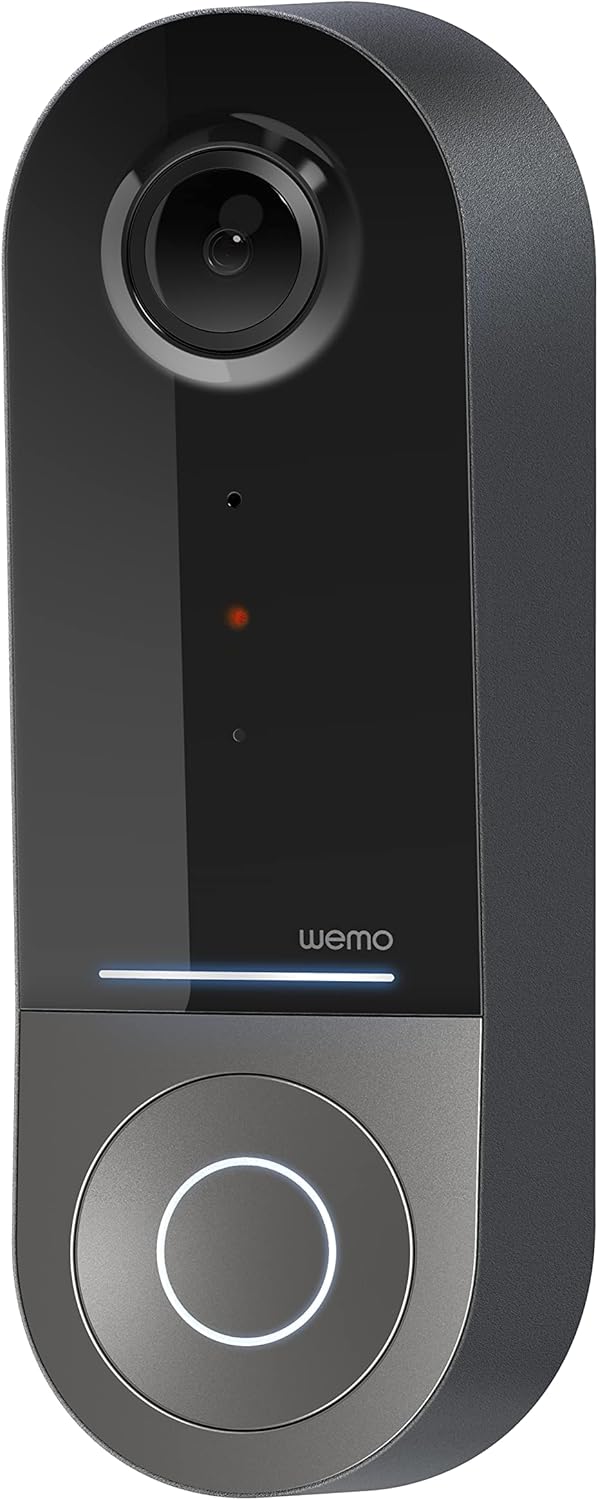
The full product name is the Wemo Smart Video Doorbell - Apple HomeKit Secure Video with HDR - Smart Home Products Video Doorbell Camera - Ring Doorbell for Security Camera System - WiFi Camera Doorbell w/ 223° FOV & 2-Way Audio. That’s a long listing title, but the practical takeaway is much simpler: this is a wired video doorbell aimed squarely at shoppers who live inside Apple’s smart home ecosystem.
Here are the core specs that matter most before you add it to your cart:
- Power requirement: existing 16-24V AC wired doorbell system
- Field of view: 178° vertical x 140° horizontal x 223° diagonal
- Video: HD camera with HDR
- Night performance: infrared night vision with low-light sensitivity
- Audio: 2-way audio
- Connectivity: 2.4GHz and 5GHz WiFi
Where this model separates itself is the Apple-specific experience. With HomeKit Secure Video, notifications can appear on your iPhone, and the listing specifically highlights face recognition support. It also supports 10-day motion-based recording history through your existing iCloud storage plan, which can be a real cost advantage if you’re already paying for Apple storage and don’t want another brand-specific subscription.
At $69.99, the Wemo sits in the lower midrange for premium-leaning smart doorbells with Apple support. That pricing matters because HomeKit-compatible video doorbells often cost more than mainstream alternatives. If you want setup details or compatibility references, it’s also smart to check the manufacturer pages from Wemo and Belkin before installation, especially if you’re unsure about wiring requirements or Apple home hub compatibility.
Wemo Smart Video Doorbell Key Features
This part of the Wemo Smart Video Doorbell review matters most if you’re comparing spec sheets and trying to decide what actually improves day-to-day use. On paper, wide viewing angles, HDR, and dual-band WiFi look like standard checklist items. In practice, they can make the difference between a doorbell that catches the whole scene and one that misses the package on the ground.
The standout feature is the 223° diagonal field of view. That’s unusually broad for a front-door camera, and it matters because visitors rarely stand at a perfect distance for the camera. A wider angle can help you see packages near the porch floor, people standing close to the door, and more of the side-to-side activity around your entry. If you’ve ever watched doorbell footage that cut off half the doorstep, you already know why that matters.
HDR video is another practical feature, not just marketing filler. Front doors often create difficult lighting: bright daylight behind a visitor, a shaded porch, or a glare-heavy afternoon angle. HDR is designed to preserve more visible detail in those mixed-light scenes so faces, clothing, and package outlines don’t wash out as easily. Add in infrared night vision, and you have better odds of getting usable footage after dark even when your porch light isn’t doing much.
The networking setup is also more flexible than many budget doorbells. With 2.4GHz WiFi, you get better range and better wall penetration, which can help if your router isn’t close to the entryway. With 5GHz WiFi, you can potentially get faster streaming when the doorbell is near the router. For shoppers in homes where the front door is a WiFi dead zone, that dual-band support can be more valuable than an extra software feature you’ll never use.
shoppers in this category typically report that feature satisfaction usually comes down to how those specs perform in the buyer’s actual home layout. Common patterns in this category suggest buyers care more about whether they can clearly see a visitor and receive alerts reliably than whether the product listing uses flashy language. That’s why the Wemo’s strengths look strongest when you match them to a wired Apple home with good WiFi near the front door.
Apple HomeKit Secure Video and iPhone Integration
If you’re deep in Apple’s ecosystem, this may be the section that decides the purchase. HomeKit Secure Video changes the ownership experience because your video doorbell can fit into the Apple Home app rather than forcing you into a more closed, brand-first ecosystem. For many iPhone users, that means a simpler daily routine: one familiar app, Apple device notifications, and less friction managing smart home gear.
The listing specifically calls out notifications to your Apple iPhone and face recognition support. For a household already using iPhones, a HomePod, or an Apple TV as part of the smart home setup, that’s a meaningful advantage. It can make front-door alerts feel more integrated and less like yet another disconnected device in a crowded app folder.
There’s also an important storage angle. The doorbell supports 10-day motion-based recording history through your existing iCloud storage plan. That can improve long-term value if you’re already paying for Apple storage anyway. But if you don’t already have a compatible plan, the total cost of ownership changes, and you should factor that in before treating the $69.99 hardware price as the full story.
This is also where the biggest limitation shows up. If your home is primarily Android, Alexa-first, or built around broader cross-platform automations, you won’t get the same benefit. shoppers in this category typically report Apple-first smart home users often value native Home app control more than broader compatibility, while non-Apple households tend to see the platform lock-in as a drawback rather than a perk. So ask yourself one simple question: do you want a general smart doorbell, or do you want one that fits the Apple home experience specifically?
Video Quality, HDR, and Night Vision Performance
For a front-door camera, raw resolution is only part of the story. The more important question is whether you can actually identify what’s happening when the scene is messy. In this Wemo Smart Video Doorbell review, the combination of HD video and HDR matters because front entrances are often the worst possible lighting environment for a camera.
Think about common scenarios: the sun is behind your visitor, your porch roof creates deep shade, or late afternoon glare blows out parts of the frame. HDR is meant to keep bright areas from overpowering darker areas quite so badly, which can help preserve facial detail and package visibility. That’s not a guarantee of perfect footage in every scene, but it’s a meaningful feature for a location where lighting changes hour by hour.
The listed infrared night vision and low-light sensitivity are just as important. Many buyers don’t leave a bright porch light on all night, and some entryways stay dim even in the evening. Infrared helps maintain visible nighttime footage so motion events aren’t reduced to vague shapes. Common patterns in this category suggest that clear nighttime event capture is one of the biggest factors in smart doorbell satisfaction, especially for package deliveries and late guest arrivals.
After installation, test it like a shopper who actually plans to rely on it:
- Stand at normal visitor distance in daylight and check facial detail.
- Place a package at the doorstep and confirm it stays visible near the bottom of the frame.
- Trigger motion at dusk to see how well HDR handles mixed lighting.
- Check nighttime clips with and without your porch light on.
In this category, these basic tests tell you more about real-world performance than product images ever will.
223° Field of View and 2-Way Audio in Daily Use
The 223° diagonal viewing angle is one of the best reasons to choose this model over more ordinary wired doorbells. A wide field of view is especially useful when your porch is small or your visitors stand close to the door. Narrower cameras can miss packages sitting low or cut off someone standing too close to the lens. This Wemo design is built to reduce that problem.
In daily use, that means better visibility for the things homeowners actually care about: delivery boxes at the threshold, kids arriving home, guests stepping out of frame quickly, and unexpected activity near the base of the door. The specs support that use case well, with 178° vertical and 140° horizontal coverage feeding into that extra-wide diagonal view.
2-way audio adds another layer of practical value. You can speak to delivery drivers, tell a guest you’ll be right there, or screen an unexpected visitor without opening the door. That’s useful for convenience, but also for peace of mind. If someone rings while you’re upstairs, at work, or away for the weekend, the feature helps turn a passive camera into an interactive front-door tool.
Common buyer concerns here are predictable: audio lag, microphone pickup, speaker volume, and app responsiveness. Those are fair questions. The right way to judge this feature is to test it from the phone you actually use most often, at the times of day your WiFi is busiest, and from the positions where visitors usually stand. A wide-angle lens and 2-way audio sound great on a listing, but they only earn their keep if they fit your porch layout and network conditions.
Installation and Setup: What Buyers Need to Know
Before you buy, be clear about one thing: this is not a battery video doorbell. The Wemo requires an existing 16-24V AC wired doorbell system. If your home doesn’t already have compatible low-voltage wiring, or if your current setup is unreliable, the installation may be more work than the $69.99 price suggests.
Use this pre-purchase checklist first:
- Verify transformer voltage: confirm your system provides 16-24V AC.
- Check WiFi signal strength: test the signal at the front door, not just near the router.
- Confirm Apple compatibility: this makes the most sense if your household uses Apple Home seriously.
- Review your iCloud plan: 10-day motion history depends on an existing compatible storage plan.
The setup path is straightforward in theory:
- Turn off power to the existing doorbell circuit.
- Remove the old wired doorbell.
- Connect the Wemo to the existing wiring.
- Mount the unit securely at the right height and angle.
- Pair it with HomeKit and complete app setup.
- Test live view, motion detection, notifications, and recorded history.
Who may struggle? Renters, owners of older homes with questionable wiring, and non-Apple users expecting a more universal setup. In this category, installation ease often depends more on the existing wiring condition than on the app itself. That’s an important distinction. If your current wired doorbell works reliably and your WiFi reaches the front door well, setup is more likely to go smoothly. If either of those conditions is shaky, expect troubleshooting.
Pros and Cons of the Wemo Smart Video Doorbell
If you just want the short version, here it is. The Wemo has a strong feature mix for Apple users, but its audience is narrower than many mainstream doorbells.
Pros
- Excellent Apple fit: HomeKit Secure Video support is the biggest reason to buy it.
- Very wide coverage: the 223° diagonal field of view is package-friendly and porch-friendly.
- Better difficult-light handling: HDR helps with bright backgrounds and shaded entryways.
- Usable after dark: infrared night vision supports low-light viewing.
- Practical communication: 2-way audio is helpful for deliveries and guests.
- Flexible networking: 2.4GHz/5GHz WiFi gives more connection options.
- Good value: $69.99 is competitive for this feature set in 2026.
Cons
- Wired-only: you need a compatible 16-24V AC setup already in place.
- Apple-first value: the appeal drops sharply if you don’t use HomeKit.
- Storage dependency: 10-day history depends on an existing compatible iCloud plan.
- Not ideal for renters: temporary installs and no-wire setups should look elsewhere.
That’s the honest split. For the right buyer, these pros matter a lot. For the wrong buyer, the cons matter more than any feature on the box.
Who Should Buy It — and Who Should Skip It
Best for: homeowners or condo owners who already use Apple Home, have a working 16-24V AC wired doorbell, and want broad porch coverage for visitors and deliveries. If package monitoring is a priority, that extra-wide viewing angle is one of the strongest practical reasons to choose it.
Consider if: you’re already paying for iCloud storage, want to avoid another brand-specific video subscription, and prefer native iPhone notifications over a separate smart doorbell app ecosystem. In that case, the Wemo can offer better long-term convenience than some mainstream competitors.
Avoid if: your household is primarily Android, you want a battery-powered doorbell, you rent and can’t modify wiring easily, or you prefer ecosystems with broader third-party integrations. Older homes with uncertain transformer compatibility should also pause before buying.
Think in terms of real use cases. If you’re a homeowner with a steady stream of deliveries and an Apple-heavy household, this makes sense. If you live in a temporary rental, want a quick peel-and-stick style setup, or need something more universal for mixed-device family members, the fit isn’t nearly as good.
Price and value
At $69.99, the Wemo is priced aggressively for what it offers. You get HomeKit Secure Video support, HDR, infrared night vision, 2-way audio, dual-band WiFi, and a 223° diagonal field of view. For Apple households, that’s a strong hardware bundle at a lower price than many shoppers expect for HomeKit-focused gear.
The smarter way to assess value is to consider total ownership cost, not just the device price. If you already have a compatible iCloud storage plan, the included 10-day motion-based recording history can make this more appealing than a doorbell that pushes you toward another monthly brand subscription. If you don’t have that plan, the value equation becomes more average because the ecosystem advantage starts costing more.
That’s not a reason to rush blindly, but it is worth checking if you’ve already confirmed wiring compatibility and were waiting for a price that feels reasonable. Common patterns in this category suggest that feature value should always be measured against setup fit, ecosystem preference, and ongoing storage expectations, not just the spec list.
Bottom line on value:
- Excellent value for Apple households with existing wiring and iCloud use.
- Average value for mixed-platform homes.
- Weak value if you need battery power or don’t care about HomeKit.
How It Compares With Amazon Alternatives
The Wemo makes the most sense when compared against Amazon alternatives that serve different ecosystems. Two practical references are a Ring Wired Doorbell or Ring Video Doorbell model, and an Apple-friendly or HomeKit-adjacent option such as the Logitech Circle View Doorbell if available during your search. The right choice depends less on raw features and more on what platform you want to live with every day.
ModelTypical PositioningPower TypePlatform StrengthCoverage FocusOngoing Storage AngleWemo Smart Video Doorbell$69.99 on Amazon at time of writingWired 16-24V ACApple HomeKit Secure Video223° diagonal wide viewUses existing compatible iCloud planRing Wired / Ring Video DoorbellVaries by modelWired or battery depending on modelAlexa / Ring ecosystemVaries by modelOften strongest with Ring subscriptionLogitech Circle View DoorbellUsually higher-priced than WemoWiredApple/HomeKit-orientedVaries by model designAlso tied to Apple ecosystem benefitsRing is often the better pick if you want broader brand recognition, a wider mix of battery and wired choices, or stronger alignment with Alexa. The trade-off is that many shoppers end up weighing a Ring subscription more heavily if recorded history matters to them.
Wemo stands out most if you’re an Apple user who wants a lower-cost way into a wired HomeKit doorbell without stepping up to a pricier Apple-friendly model. A HomeKit-adjacent alternative like Logitech may appeal if you want to stay in Apple’s ecosystem and are willing to pay more, but at $69.99, the Wemo’s value story is hard to ignore for the specific buyer it’s built for.
Final Verdict: Should You Buy the Wemo Smart Video Doorbell?
To close this Wemo Smart Video Doorbell review, the recommendation is consistent with the opening verdict: buy it if you’re an Apple Home user with compatible 16-24V AC wiring and want a wide-angle wired video doorbell at a reasonable price. Skip it if you need battery power, use Android, or want the broadest possible ecosystem flexibility.
The central takeaway is simple. This is a somewhat niche product, but it’s a compelling one for the right home. Its biggest strengths are HomeKit Secure Video support, 223° field of view, HDR, night vision, and competitive $69.99 pricing. Its main limitation is equally clear: the value drops fast if you aren’t already invested in Apple’s ecosystem or if your wiring setup isn’t compatible.
Before buying, check three things: wiring compatibility, front-door WiFi strength, and your iCloud/HomeKit setup. This article contains affiliate links, which means I may earn a commission if you buy through them, at no extra cost to you.
Pros
-
Native Apple HomeKit Secure Video support with iPhone notifications and face recognition support.
-
Extra-wide 223° diagonal field of view is excellent for package monitoring and close-range porch activity.
-
HDR video helps with difficult lighting, including bright backgrounds and shaded entryways.
-
Infrared night vision improves low-light visibility after dark.
-
2-way audio adds practical value for deliveries, missed guests, and screening visitors.
-
Dual-band 2.4GHz and 5GHz WiFi gives more installation flexibility than single-band doorbells.
-
Competitive $69.99 price for a wired Apple-focused smart doorbell in 2026.
Cons
-
Wired-only installation means you need an existing 16-24V AC doorbell system.
-
Best value is really limited to Apple households using HomeKit Secure Video.
-
10-day motion recording history depends on having a compatible existing iCloud storage plan.
-
Not the best fit for renters, temporary setups, or homes with older incompatible wiring.
Verdict
Yes—if you’re an Apple household with existing 16-24V AC doorbell wiring, the Wemo Smart Video Doorbell is worth buying in 2026. At $69.99, it delivers the features that matter most for that audience: HomeKit Secure Video, HDR, infrared night vision, 2-way audio, dual-band WiFi, and an unusually wide 223° diagonal field of view. The catch is simple: if you need a battery model, use Android, or don’t want your smart doorbell tied closely to Apple’s ecosystem and an iCloud plan, you should probably look elsewhere. This article contains affiliate links, and the recommendation is based on product specs, Amazon data, and typical buyer priorities patterns rather than hype.
Frequently Asked Questions
Why are people getting rid of Ring doorbells?
Some shoppers move away from Ring because they want different platform support, especially Apple HomeKit, or they want to avoid another app or subscription. Others prefer a wired or battery model with a different field of view, privacy setup, or smart home ecosystem fit.
Does Ring have a monthly fee?
Ring often works best with a Ring Protect subscription if you want recorded video history and advanced cloud features. You can still use some live view and alert functions without paying monthly, but the long-term value depends on which features you actually need.
What is the downside of Ring?
The main downside of Ring for some buyers is ecosystem preference: it fits Alexa households better than Apple Home users. Depending on the model, buyers may also weigh subscription costs, app dependence, and whether they want wired or battery installation.
Do burglars avoid houses with Ring doorbells?
Visible video doorbells can act as a deterrent, but no device can guarantee that burglars will avoid a home. Their biggest benefit is usually better visibility, motion alerts, and recorded evidence rather than prevention alone.
Key Takeaways
-
The Wemo Smart Video Doorbell is a strong 2026 buy for Apple households with existing 16-24V AC wiring.
-
Its best features are HomeKit Secure Video support, HDR video, infrared night vision, dual-band WiFi, 2-way audio, and a very wide 223° field of view.
-
At $69.99, it offers excellent value for Apple users already paying for a compatible iCloud storage plan.
-
It is not a good fit for renters, battery-doorbell shoppers, Android households, or homes with uncertain wiring compatibility.
-
Check wiring, WiFi strength at the front door, and Apple/iCloud setup before purchasing.
{ “@context”: “https://schema.org”, “@type”: “FAQPage”, “mainEntity”: [ { “@type”: “Question”, “name”: “Why are people getting rid of Ring doorbells?”, “acceptedAnswer”: { “@type”: “Answer”, “text”: “Some shoppers move away from Ring because they want different platform support, especially Apple HomeKit, or they want to avoid another app or subscription. Others prefer a wired or battery model with a different field of view, privacy setup, or smart home ecosystem fit.” } }, { “@type”: “Question”, “name”: “Does Ring have a monthly fee?”, “acceptedAnswer”: { “@type”: “Answer”, “text”: “Ring often works best with a Ring Protect subscription if you want recorded video history and advanced cloud features. You can still use some live view and alert functions without paying monthly, but the long-term value depends on which features you actually need.” } }, { “@type”: “Question”, “name”: “What is the downside of Ring?”, “acceptedAnswer”: { “@type”: “Answer”, “text”: “The main downside of Ring for some buyers is ecosystem preference: it fits Alexa households better than Apple Home users. Depending on the model, buyers may also weigh subscription costs, app dependence, and whether they want wired or battery installation.” } }, { “@type”: “Question”, “name”: “Do burglars avoid houses with Ring doorbells?”, “acceptedAnswer”: { “@type”: “Answer”, “text”: “Visible video doorbells can act as a deterrent, but no device can guarantee that burglars will avoid a home. Their biggest benefit is usually better visibility, motion alerts, and recorded evidence rather than prevention alone.” } } ] } { “@context”: “https://schema.org”, “@type”: “Review”, “name”: “Wemo Smart Video Doorbell - Apple HomeKit Secure Video with HDR - Smart Home Products Video Doorbell Camera - Ring Doorbell for Security Camera System - WiFi Camera Doorbell w/ 223° FOV & 2-Way Audio Review”, “description”: “Wemo Smart Video Doorbell review for 2026: HomeKit, HDR, 223° FOV, 2-way audio, pros, cons, price, and whether it’s worth buying on Amazon.”, “datePublished”: “2026-06-12T17:06:14+00:00”, “author”: { “@type”: “Organization”, “name”: “AIWiseMind” }, “reviewBody”: “Yes—if you’re an Apple household with existing 16-24V AC doorbell wiring, the Wemo Smart Video Doorbell is worth buying in 2026. At $69.99, it delivers the features that matter most for that audience: HomeKit Secure Video, HDR, infrared night vision, 2-way audio, dual-band WiFi, and an unusually wide 223° diagonal field of view. The catch is simple: if you need a battery model, use Android, or don’t want your smart doorbell tied closely to Apple’s ecosystem and an iCloud plan, you should probably look elsewhere. This article contains affiliate links, and the recommendation is based on product specs, Amazon data, and typical buyer priorities patterns rather than hype.
” } Disclosure: As an Amazon Associate, I earn from qualifying purchases.
Disclosure: As an Amazon Associate, I earn from qualifying purchases.